PHAROS DATA ARK · 2026-10-29-01024f5b59
Community board
Open the board. This is a small, local place for announcements, requests, offers, and general discussion. No internet, account, email address, or external service is required. Anyone who can reach the Ark can read posts and replies. Display names are optional and unverified. Messages support safe offline Markdown, formatting help and optional preview. There are no attachments, external embeds, private messages or post-subscription notifications. Banner broadcasts are a separate feature described below. Replies can be nested under any message.
Posting and removal
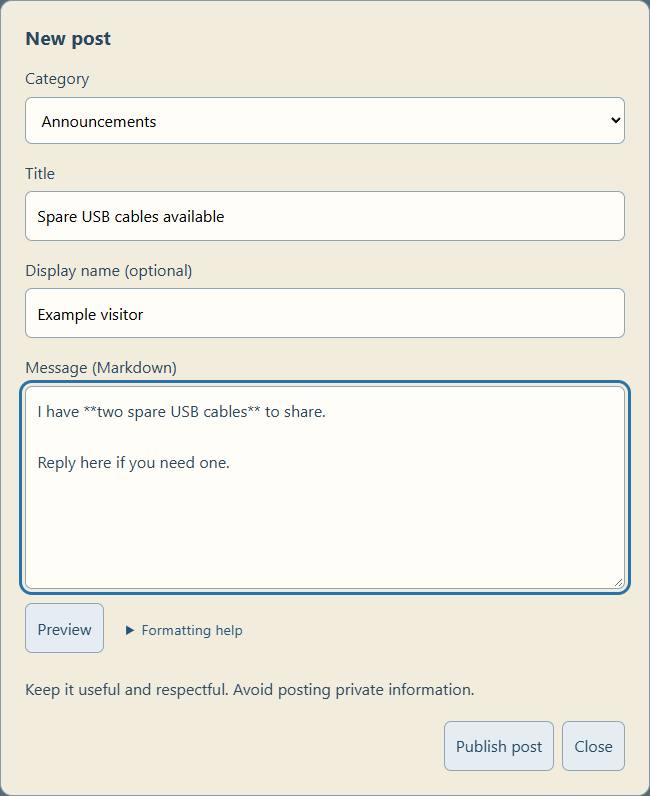
Choose New post, a category, a title, and a message. Replies appear beneath the original post. Each successful post or reply returns a random deletion code shown once. Keep it to remove your own message. Codes are not saved in browser storage or returned with public messages. The database stores only their SHA-256 hashes. Losing a code means asking the caretaker for help. Removing the original post removes its replies too; the removal dialog states this before submission.
Every message has a Remove button. Enter its deletion code, or select caretaker moderation and use the existing Ark caretaker password. Caretakers can remove any message. Caretaker credentials are requested by the shared on-demand pop-up. Its optional slide switch remembers them for the chosen number of minutes in this browser tab; without that choice they are used only for the action. Rejected codes/passwords leave the conversation unchanged. As elsewhere on the Ark's HTTP interface, this is intended for a trusted local network.
Read access is open. Posting is bounded by per-device and board-wide limits. Default limits are six messages per minute per device, 100 per minute overall, 5,000 total posts/replies, 200 replies per thread, 4,000 characters per message, 120 for titles, and 40 for names. At capacity the board asks the caretaker to clear old conversations; it does not silently expire discussions. Different people behind the same proxy may share a rate limit. Rate-limit identifiers are salted hashes of addresses, kept for approximately one minute; raw addresses are not stored in the board database. Apache may still record its normal access logs.
Message of the day
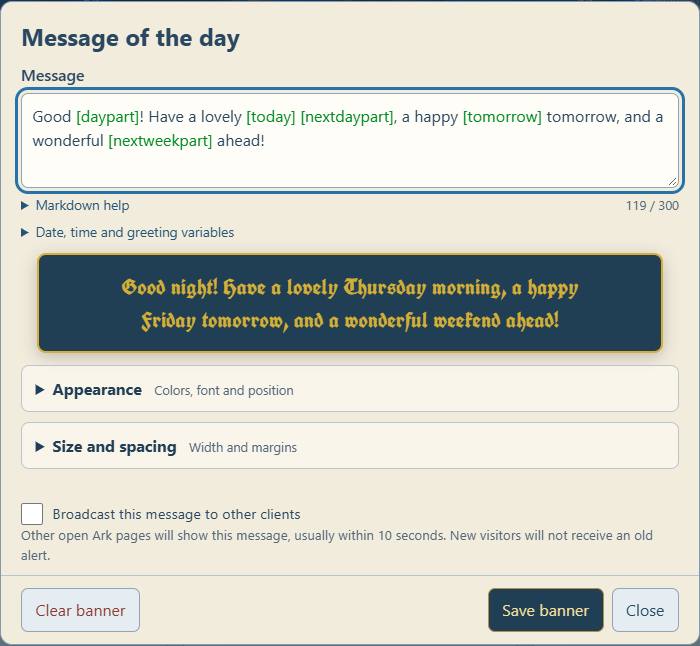
On the landing page, open Settings → System → Ark banner… to set a short caretaker announcement. A live preview shows the text before saving. Background and text colors each have a picker and hex field. Automatic contrast is optional; selecting or changing a text color switches to manual mode. The chosen color is stored with the message and backed up with it. Existing colors are retained. Position is configurable: top, below header, or fixed bottom on both pages. It supports Markdown formatting, at most 300 source characters, and requires the caretaker password to save, replace or clear. An empty message hides the banner entirely. No announcement is published by the installer.
The banner persists through restarts until deliberately cleared or replaced; “message of the day” does not imply automatic daily expiry. Open pages check once a minute while visible, and when brought back into view. A newly opened page loads the current message immediately. The previous displayed message remains during a temporary API failure. The landing page updates its banner immediately after saving. All renderer assets are served locally; there are no runtime internet or CDN requests.
The preview and published banner use the same Markdown renderer. Supported formatting includes headings, bold, italics, strikethrough, lists, blockquotes, links, inline/fenced code, tables, task lists, and line breaks. Raw HTML is literal text. Images show their alt descriptions instead of loading resources. Link destinations allow only HTTP, HTTPS, mailto and relative local links; unsafe schemes are omitted. External links open a separate tab with noopener/noreferrer. Posts and replies use this same renderer and retain editable Markdown source.
The official Marked lexer is vendored at app/static/assets/vendor/marked, with its MIT license and a pinned package version, registry integrity value and file hashes in version.json. notice-markdown.js builds an allowlisted DOM tree from tokens; it never inserts parser-produced HTML. The raw Markdown remains in SQLite and backups, so existing plain messages work unchanged. To update the parser, use an official npm release, verify its dist integrity, retain the license and hashes, then run tests/test_notice_markdown.mjs and browser-preview checks before deployment. Marked documentation.
The announcement is stored in the board database's metadata table and included in its private snapshots and caretaker backup download. It remains readable/settable even when normal board posting is disabled in configuration. API: public GET and caretaker-authenticated POST /api/community/notice. The heading banner assets are ark-notice.js and ark-notice.css; the System editor is ark-banner-admin.js. The former community-board editor button is removed.
Storage and backup
Live SQLite database: /var/lib/dataark/community/board.sqlite3, owned by admin, private directory mode 0700 and database mode 0600. WAL journaling and transactions keep concurrent posts consistent. The board is separate from the SSD content catalogue and public HTTP/FTP/SMB file shares. No user messages, credentials, or deletion hashes belong in Git, the public content profile, or the source recovery archive.
dataark-community-backup.timer takes an online SQLite snapshot daily, with up to a five-minute scheduling delay. It catches up after downtime. The default seven most recent daily copies are retained in /var/backups/dataark-community, private to admin. Repeated runs on the same UTC date replace that day's snapshot. Removing a live post does not erase older backup copies; they age out with retention. systemctl list-timers dataark-community-backup.timer shows the actual next run. Run sudo systemctl start dataark-community-backup.service to request a snapshot now.
These automatic snapshots are on the same system card, so they protect against an application/data mistake, not card failure. Use Download backup on the board and the caretaker password to save an online SQLite snapshot to another device. Keep that downloaded file private: it includes message history and deletion-code hashes. Snapshots are integrity-checked before being published as backups.
Restore a board backup
Choose Restore backup… on the community board. Select a SQLite board backup from the device running the browser and enter the caretaker password. Validate backup uploads it to private staging on the Pi and previews its post/reply counts, newest message date, and banner. This stage does not alter current messages or the banner. Both downloaded backups and the daily .sqlite3 snapshots are accepted; files are limited to 128 MiB and the currently configured board capacity/category/reply limits.
Review the replacement warning, check the confirmation box, and choose Restore this backup. Restore replaces conversations and the banner, including its Markdown and background color; it does not merge data. It can remove newer messages and bring back removed messages. Existing author deletion codes work again because their hashes are restored. Live authentication/rate-limit state is retained instead of being rolled back.
The server saves a private, integrity-checked before-restore-*.sqlite3 snapshot of the current board before beginning replacement. It retains the latest three of these separately from the seven daily snapshots, in /var/backups/dataark-community. These still reside on the same system card. The restore result gives the safety snapshot's filename; a caretaker can copy that file through the Pi's terminal/file tools and select it in the restore flow to undo a mistaken restore. Keep an off-device copy for card failure. If the safety copy or database transaction fails, the live board is not replaced. If cleanup fails after a committed restore, the result explicitly says the restore succeeded with a cleanup warning.
A preview is tied to the requesting device and expires after ten minutes. If a post, reply, deletion, or banner edit changes the live board after preview, restoration is rejected and the file must be validated again. Choosing another backup supersedes that device's previous preview. At most three device previews are retained; expired staging is cleared by subsequent restore activity and the daily backup service. The shared optional caretaker cache follows its selected tab-scoped expiry; closing the restore dialog alone does not clear a remembered credential. Use Lock now or the floating padlock to clear it. Losing the connection during the final request can leave its result uncertain: refresh the board before retrying.
Only validated message rows and the banner are imported. Uploaded SQL schema, triggers, views, runtime salts, and counters are never installed into the live database. Original SQLite input is read-only, extension loading is disabled, schema/version/content/count/hash/date/parent relationships are checked, and prepared data is kept privately with a checksum. The final replacement uses the known live schema within a single write transaction. Public readers do not receive a restore endpoint without caretaker authentication. Preview and apply APIs are /api/community/restore/preview (binary SQLite body) and /api/community/restore/apply (review token and explicit confirmation). New implementation: app/services/community_restore.py.
Tests exercise actual SQLite restore round trips, retained deletion codes and banner color, pre-restore snapshots, stale-preview conflicts, invalid schema/files, staging tampering, expired/wrong-device tokens, failed safety copies, mid-transaction failures, retention, and route authentication. These tests run on temporary databases; deploying the feature does not restore or replace the running board.
Source, configuration, and installation
Human-readable policy: /opt/dataark/config/community.json. Change it locally, then restart dataark. enabled: false closes board API access while retaining messages. API routes remain registered but refuse normal reads/writes when disabled. Supported limits have upper safety bounds in the service code. The backup timer fails while disabled; existing snapshots remain. Categories should not be renamed/removed while old posts still use their IDs without a migration.
Install with sudo python3 /opt/dataark/deploy/install_community.py, then restart dataark and deploy the web interface using bash /opt/dataark/deploy/deploy-web.sh. The stock-Pi coordinator includes this installer, but its full spare-Pi acceptance test remains outstanding. No extra Python packages, database server, root helper, or passwordless root permission is needed for normal board operation.
Source: app/services/community.py, app/routers/community.py, app/static/community.html, app/static/assets/js/community.js, tools/backup_community.py, and deploy/install_community.py. GitHub repository. The landing-page link is maintained in app/templates/index.html. Tests cover posting, replies, pagination, hashes and code rejection, rate limits, capacity, public-field boundaries, moderation authentication, request size/origin restrictions, and backup/restoration to a temporary database.
The API under /api/community is described by the Ark's Developer API. JSON mutation requests and same-origin browser checks prevent unrelated sites from silently posting; all content is inserted into the page as text. The board does not federate or synchronize between Arks. Each Ark is its own community.
Banner appearance
System → Ark banner offers a background picker, manual text color or automatic contrast, and Full width / Fit text / Custom side margins. Margins are equal percentages on each side (0–40%); fit text wraps within the screen. New banners default to DEJ-style gold (#d4af37) on dark blue (#203e54). Existing banner colors are retained. These settings are stored with the message and survive backup/restore. The preview shows appearance before saving.
Top and bottom banner margins are independently configurable from 0–200 CSS pixels in every width mode, defaulting to 12 px each. They are previewed and preserved in backups.
Banner font choices are Modern (system sans serif), Old English (UnifrakturCook), Classic (Georgia/serif), and Typewriter (monospace). Old English is bundled locally with its SIL Open Font License and pinned source/hash record in app/static/assets/fonts/unifrakturcook; it does not contact Google or require internet. Existing banners retain Modern until changed. Font selection survives backup/restore.
Banner position can be Top of page (existing behavior), Below the header, or Fixed at the bottom. Fixed banners remain visible during scrolling, reserve space at the end of the page, and have a scrollable height limit on small screens. Placement applies on the dashboard and community board and survives backup/restore. The editor preview stays within the dialog.
Message bookmarks and private removal links
Every post and reply has a public Permalink that opens its conversation and highlights the selected message. Posting receipts include that public link and a private preview/delete link containing the original deletion code in the URL fragment (#thread=…&message=…&delete=…). The fragment is not sent with HTTP page requests; the code is sent only when the user submits the explicit removal confirmation. A link never deletes on opening. The preview shows the author, date and message; removing a root post also removes its replies.
Keep private links confidential: anyone holding one can remove that message. Browser bookmark/history sync can copy them to the browser account. The server cannot recover a forgotten deletion code or regenerate the private link; an existing code can still be entered in Remove. Public links carry no deletion permission. Deleted messages show an unavailable notice. Links depend on reaching the same Ark host; moving to another hostname/IP may require updating the saved address. Backups preserve author-code hashes, so restored messages retain their original private links.
Caretaker edits
The caretaker can remove any message or edit its title/body through Edit… with the caretaker password. Display name, original timestamp, category and author deletion code are preserved. Every changed message carries “Edited by caretaker” and the last edit time; the public thread list marks an edited root post too. Unchanged saves create no marker. A stale editor is refused rather than overwriting a newer version. Markers and revision counts survive backup/restore and are removed with the corresponding message. This is a last-edit marker, not a retained history of original message contents.
Markdown and nested replies
Messages and replies support offline Markdown through the same allowlisted DOM renderer as banners. Titles/names stay plain text. Formatting help and optional live Preview are available in New post, Reply and caretaker Edit. Raw HTML remains literal; images become alt text without remote requests; unsafe link protocols are not made clickable. Source text is saved unchanged and can be edited again.
Every message has Reply. Responses appear beneath their target; the shared reply composer identifies that target and can return to replying to the conversation. Existing flat replies remain direct replies to the root. Removing a reply preserves its responses and moves them up to its parent. Removing the root conversation still removes all replies. Relationships remain inside one conversation and survive backup/restore; malformed or cyclic/forward relationships are rejected on restore. Deep indentation is capped visually on narrow screens.
Live banner variables
The message-of-the-day banner supports [daypart], [weekday], [date:MM/DD], and [time:h:mm A]. For example: Good [daypart]! Have a lovely [today] [nextdaypart], a happy [tomorrow] tomorrow, and a wonderful [nextweekpart] ahead! Values are evaluated on the viewing device using its local clock/timezone; different devices can show different local times. Formatting uses English names. The saved template remains unchanged. The live banner and editor preview refresh locally each second when visible; API checks remain once per minute.
Supported format tokens: YYYY/YY (year), MMMM/MMM/MM/M (month), DD/D (day), dddd/ddd (weekday), HH/H (24-hour), hh/h (12-hour), mm/m (minute), ss/s (second), A/a (AM/PM). Single-quoted words in a format are literal. Examples: [date:YYYY-MM-DD], [date:ddd, MMM D], [time:HH:mm:ss]. [date] defaults to MM/DD, [time] to h:mm A. [Monday] and other weekday names are aliases for the current weekday; [morning], [afternoon], [evening], and [night] all mean the current daypart. [MM/DD] or sample dates such as [10/26] also mean the current MM/DD date. Morning starts at 05:00, afternoon at 12:00, evening at 17:00, night at 21:00.
Variables are enabled only for the banner and its preview, not community posts. Markdown formatting still works. Code and link destinations stay literal, unknown variables are preserved, and substitution creates text nodes rather than executable HTML.
Upcoming greetings and calendar ranges
[nextdaypart] cycles morning → afternoon → evening → night → morning. [tomorrow] gives tomorrow's weekday; [tomorrow:MM/DD] or another format gives its date. Calendar arithmetic uses local dates, not a fixed 24-hour offset, so daylight-saving transitions do not skip dates.
[weekpart] (also [currentweekpart] or [weekorweekend]) gives week Monday–Friday and weekend Saturday–Sunday. [nextweekpart] (also [upcomingweekpart] or [upcomingweekorweekend]) gives the next opposite period. Example: Good [daypart]! Have a lovely [today] [nextdaypart], a happy [tomorrow] tomorrow, and a wonderful [nextweekpart] ahead!
[thisweek] / [currentweek] and [nextweek] / [upcomingweek] give Monday–Sunday date ranges. [thisweekend] / [currentweekend] means the current Saturday–Sunday if already on the weekend, otherwise the coming weekend. [nextweekend] / [upcomingweekend] always means the next Saturday–Sunday that has not started. Ranges default to MM/DD and accept formats, e.g. [nextweekend:MMM D].
Broadcast the message to other open clients
The banner editor has an opt-in Broadcast this message to other clients checkbox, initially unchecked each time it opens. Save with this checked to create a new notification identifier. Other open Ark HTML pages (including documentation and configuration pages) check about every 10 seconds and show the updated Markdown message in a dismissible dialog. The saving page suppresses its own alert. New visitors establish a baseline and do not see old alerts. Each tab acknowledges a notification in session storage, so dismissing/reloading does not repeat it. Background pages display pending alerts when visible; another open dialog is allowed to finish first. The latest update replaces pending earlier updates. There is no guaranteed delivery to disconnected clients and no operating-system push service; standalone PDFs, Kiwix and remote-desktop applications cannot run this client. Ordinary saves and Clear do not send pop-ups. Existing Markdown, variable expansion and banner appearance are retained.
Fit-to-text banners balance each explicitly separated line independently on narrow screens, preserving intentional newlines while avoiding stranded final words where the browser supports balanced wrapping. The Old English font was checked at 320, 360, 390 and 430 pixel viewport widths.
[today] gives the current weekday, matching [tomorrow] for the next day. Use [today:MM/DD] or [today:YYYY-MM-DD] for a date, or another supported format. It uses the viewing device’s local date.
The message editor colors recognized variable references bright green and unknown references red with a wavy underline. Recognition uses the same rules as published variable expansion, including date/time formats. Markdown link labels and escaped brackets are not treated as variables. Coloring does not change the stored message, and unknown references remain literal in the published banner.