PHAROS DATA ARK · 2026-10-29-01024f5b59
Software updates and maintenance
Check for updates is available from Help. It reads official Pharos software releases on GitHub when requested. Anyone can inspect availability; no caretaker password is needed to read version information. Checks are cached for one minute, do not execute downloaded code, and do not install or download a kit. Preview releases are opt-in. Documentation releases are excluded.
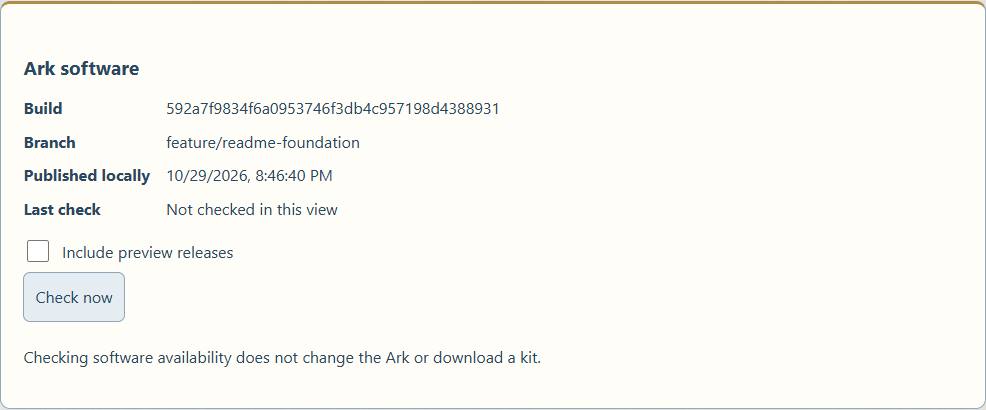
The installed build revision, branch and local publication time identify the running software. The checker compares published source revisions using local Git history when possible. A development build containing a published release is reported as ahead, not offered the old kit as an upgrade. Missing Git history or incomparable revisions produce an explicit comparison warning. An unavailable check never means “up to date.” The last successful result can be retained within the running service; restarting the service clears that cache.
Three distinct updates
- Ark software: dashboard, API, maintenance tools, service definitions and bundled documentation. Configuration migrations may be needed.
- Library content: publisher editions, collections and map packages. Manage Library owns these schedules and downloads, independently of software releases.
- Operating system: Debian packages, security patches, kernel, firmware and drivers. These have their own package sources, compatibility checks and restart requirements.
The current public archive is a bootstrap/recovery kit, not an in-place update package. Running its provisioning script against a working Ark is not the software update workflow. Help also provides a separate, caretaker-authorized Install a signed software update workflow. A bootstrap archive will be rejected there. Published software-YYYY.MM.DD releases are distinguished from bootstrap-YYYY.MM.DD releases; both may have a -preview.N suffix.
Software-only installer
Choose a signed .tar.gz update package, select Verify and stage, review the release and file/removal counts, then select Install staged update. Staging does not change running software. Installation asks for caretaker authorization on demand, confirms the restart, and queues a fixed root-owned systemd worker so the browser connection can close safely. The page reconnects to show completion or rollback.
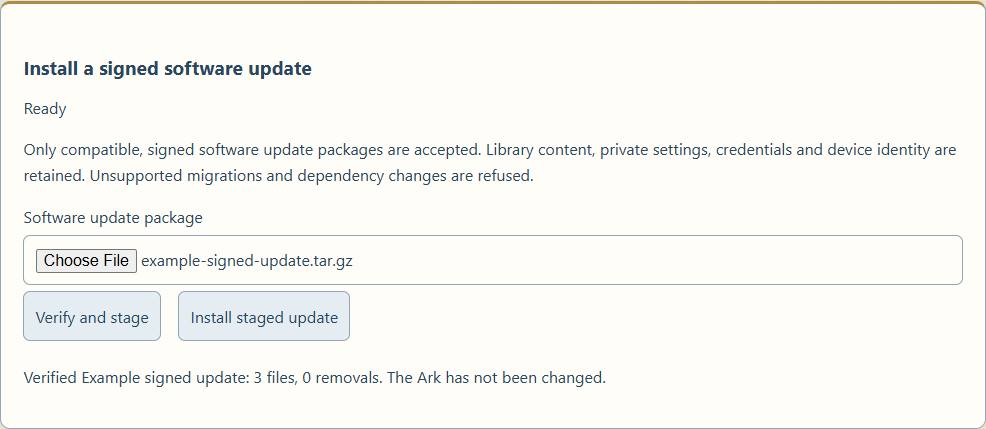
Version 1 updates application Python, frontend JavaScript/CSS, configuration-page HTML and handbook source/rendered pages. It does not replace the personalized landing-page HTML, private configuration, content, community database, credentials, TLS/clone identity, network profiles, dependencies, OS packages, privileged helpers or service definitions. Templates and provisioning changes need a separately reviewed deployment. Packages declaring a schema migration or changed dependency lock are refused before installation.
An enrolled baseline records hashes of managed files. A package must match the installed base revision and platform profile, have a higher sequence number, and verify against a root-owned Ed25519 release key. Local edits and untracked target files require review; they are not silently overwritten. Archive size, expansion, paths, duplicate members, links, inventory and hashes are checked. Packages contain files and a signed manifest only; there are no executable package hooks.
After staging, the worker verifies again, refuses active content/configuration/bug-out work, stops the API, snapshots affected software and publication metadata, and applies atomic file replacements with a durable journal. Failed health checks restore the previous files, ownership, modes, build identity and receipt. Boot recovery restores an interrupted transaction before the API starts, then a separate service verifies it after startup. A rollback that fails health checks remains visibly unresolved. Content and databases are not migrated or rewritten by this installer.
Transactions and backups live in root-only /var/lib/dataark-software-updates, outside the admin-writable application state. Each transaction retains a readable result.json with release, timestamp, outcome and any failure; the installed receipt records the current revision and installation date. The upload inbox is separate. Do not delete transaction backups while an update or recovery is unresolved. Completed backups are retained for inspection; automatic backup pruning is not implemented.
Signing and enrollment
The DEJ release public key is config/software-update-release-key.pem. The installer copies it into root-owned /etc/dataark/software-update-keys. The original development Ark keeps its private release key under /root/.local/share/dataark/release-signing, mode 0700 with a mode-0600 key. Private signing material is excluded from Git, content-drive clones and installation kits. Back it up separately to encrypted administrator storage; loss of the key requires deliberate trust-key replacement on affected devices. A caretaker password does not grant release-signing authority. Independent maintainers can enroll their own reviewed public keys as root; no DEJ account or online signing service is required.
Install the root helper and initial baseline on an existing reviewed Ark:
cd /opt/dataark
sudo python3 deploy/install_software_updater.py
New bootstrap installations perform this enrollment in the finish phase using the verified kit revision and selected platform. A legacy system without a usable build identity needs explicit reviewed --revision and --profile arguments; do not invent a source revision. Re-running the installer preserves its baseline rather than blessing local edits.
Package format and builder
An update archive contains manifest.json, manifest.sig and regular files under payload/source/ or payload/web/. The signed manifest declares release/sequence, source/base revisions, supported profiles, unchanged requirements hash, configuration schema, an empty migrations list, file sizes/hashes and explicit removals. source/ maps to /opt/dataark; web/ maps to /var/www/html. The path allowlist in tools/software_update.py is authoritative.
Build only an explicitly reviewed payload. This example runs on the original signing Ark; replace each example argument with the intended release inputs:
cd /opt/dataark
sudo python3 tools/build_software_update.py \
  --payload /path/to/reviewed-payload \
  --baseline /var/lib/dataark-software-updates/installed.json \
  --requirements /opt/dataark/requirements.txt \
  --signing-key /root/.local/share/dataark/release-signing/private.pem \
  --output /path/to/data-ark-software-YYYY.MM.DD.tar.gz \
  --release software-YYYY.MM.DD \
  --revision FULL_REVIEWED_SOURCE_COMMIT
Publish immutable software packages and release notes on GitHub Releases. The checker recognizes their naming convention, but installation still validates the package signature, base, profile and baseline locally. An already acquired package can be staged while offline.
Home Assistant's health response includes software_update; its stable fingerprint changes on software outcomes and installed revisions. The example HA configuration includes that attribute and passes it through dataark_health_changed events. Apply the matching attribute addition to an existing HA installation to retain the detailed software payload.
In-place update contract
The wider update contract, including future schema/dependency/provisioning changes, is:
- Select an immutable release and channel, with an explicit platform profile and supported configuration/schema range. Verify its manifest and package digest against trusted release metadata; reject an incompatible platform, unsafe downgrade or edited deployment requiring review.
- Check space, active downloads/restoration, bug-out activity and available access paths. Stage the complete package before changing the running system. Offline installation from an already acquired, verified package should use the same validation path.
- Snapshot the installed software and back up mutable state before migrations. Preserve content selection and files, public and private configuration, community posts and banner, usage history, caretaker credentials, TLS/clone identity, network profiles and adapter assignments. Never copy the publisher's identity or credentials over the device's own.
- Show the version, changes and expected interruption, then request caretaker authorization on demand. Apply only explicit, versioned, repeatable migrations and allow a controlled service restart; reboot only when required and disclosed.
- Verify API, dashboard, content readers, storage and network reachability after installation. Commit the new version only after health checks pass. On failure, restore compatible software and state, record diagnostics, and expose recovery instructions. Database migrations need an actual restore path, not merely an old executable.
- Record installed version, date, outcome and rollback result; notify Home Assistant through the existing integration event path. Keep a local readable history.
The software-only engine has signed-package, failure, interruption and state-preservation tests, including real API stop/start and rollback in the disposable ARM64 QEMU Ark. Unsupported migrations are tested as refusals. This does not establish migration recovery or fresh physical-media acceptance; keep those as separate tests on feature/readme-foundation before merging or widening the installer.
Bluetooth
The reference Raspberry Pi 4 has Bluetooth hardware. The current Ark's controller and Bluetooth service have been detected; its radio is powered off and undiscoverable. Practical uses include keyboards, mice, audio devices and specialized serial peripherals. Radio presence does not establish that every peripheral profile works. Power it on and pair devices on demand through operating-system controls; keep discovery and automatic pairing off during ordinary operation. Bluetooth is not currently an Ark content-serving transport or a dashboard-managed feature.